- step :
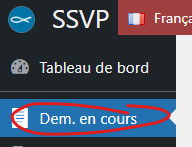
- Go to the “Req. Progress” section of the main menu.
Colums headings:
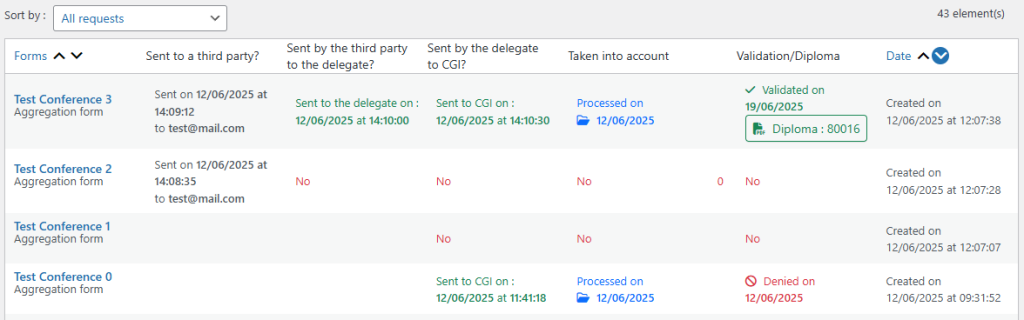
- Columns “Forms” :
- Indicates the name of the conference entered in the form. (in blue)
- Indicates the type of application form (grey)
- Column “Sent to a third party ?” :
- Iindicates whether the request has been sent to a third party.
- Indicates the day and time the request was sent and the e-mail address of the third party.
- Column “Sent by the third party to the delegate ?” :
- Only useful if the request has been sent to a third party.
- Indicates whether the request has been completed by the third party.
- Indicates the day and time when the third party completed the form.
- Column “Sent by the delegate to CGI ?” :
- Indicates whether you have completed and sent the request to the CGI.
- Indicates the day and time you submitted the form.
- Column “Taken into account” :
- Indicates the status of your request in the following stages:
- “No” = indicates that you have not yet submitted your request.
- “Pending” = indicates that you have sent your application but that it has not yet been read by the CGI..
- ‘Taken into account on DD/MM/YYYY’ = indicates that your request has been read by the CGI.
- Indicates the status of your request in the following stages:
- Column “Validation / Diploma” :
- Indicates the status of your request in the following stages :
- “Validated on DD/MM/YYYY Diploma: 80000” = Indicates that your application has been validated and that you can download your diploma.
- ‘Denied on DD/MM/YYYY’ = Indicates that your request has been denied by the CGI team.
- Indicates the status of your request in the following stages :
- Column “Date” :
- Refers to the initial date your request was created.
Sorting options :
See the list of filters and their functions :
- Ongoing requests : Displays only requests that have not been validated or refused by the CGI.
- All requests: Displays all requests without any filter.
- Pending: Transmission to the delegate by the third party: Displays only requests that are awaiting completion by a third-party applicant.
- Pending: Transmission to CGI: Displays only requests that you have not yet transmitted to CGI.
- Pending: Taken into account by CGI: Displays only requests that you have forwarded and are waiting to be processed by CGI.
- Pending: Diploma validation: Displays only requests that are supported and awaiting validation by the CGI.
- Sent to a third party: Displays only requests that have been sent to a third-party applicant
- Sent by the third party to the delegate: Displays all requests that have been completed by a third-party applicant.
- Sent to CGI by the delegate: Displays all requests you have sent to CGI.
- Ongoing: Displays only requests that have been read by the CGI.
- Pending : Displays all requests that have not yet been read by the CGI.
- Diploma granted: Only displays applications validated by CGI.
- Diploma denied: Displays only requests that were refused by CGI.