Applications for the institution of a National or Superior Council must be made using the paper form available for download on the portal. It is important to note that the CGI now only processes applications for the institution of National or Superior Councils. Applications concerning the institution of other councils at lower levels (diocesan, regional, local, etc.) are now the responsibility of the National Councils.
To download, complete and return your request for an institution, please follow these steps:
Download the Institution Application Form :
- step :
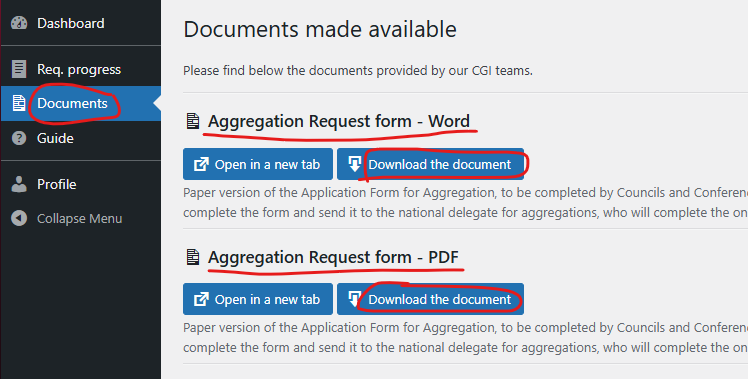
- Go to the “Documents” section of the main menu.
- Download the request for institution via the “Download the document” button, in Word or PDF format.
- step :
- Print, complete and sign the document in the usual way (by hand or on the computer without printing).
- step :
- Scan the completed document (si rempli à la main)..
Submit an application for Institution :
- step :
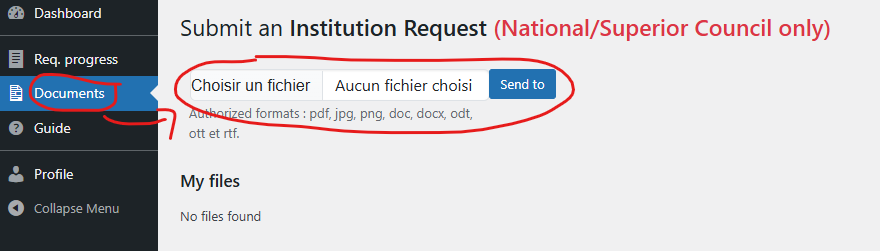
- Go back to the ‘Documents’ section of the main menu..
- Submit the completed document in the “Submit an Institution Request” section.
Congratulations! Your application has now been submitted.
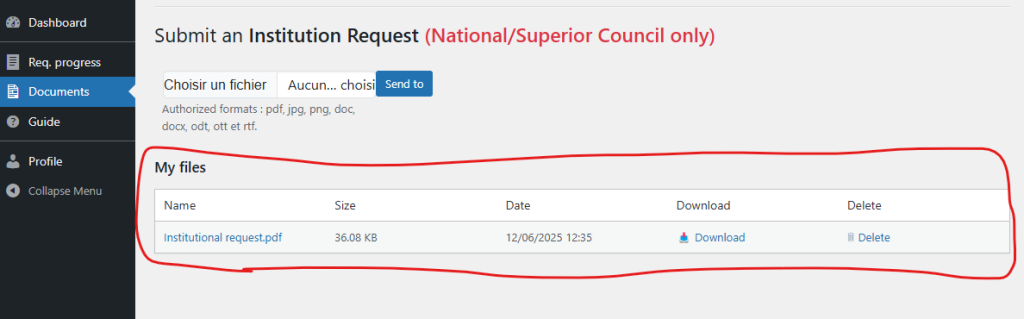
Managing filed documents :
You can track your submitted documents using the table below the submission form.