You can allow a third party, your Councils and Conferences, to fill in their own requests. A link will then be sent to them by email so that they can fill in the form without having to log in to the portal. Before sending the form to the third party, you can choose to fill it in partially or completely, or not at all.
Once completed and validated by the third party, these requests will be sent to you as the National delegate, and it will be your responsibility to validate them and forward them to the CGI.
To create and send an aggregation request to a third party, please follow these steps :
- step :
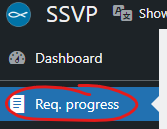
- In the main menu, go to “Req. Progress“.
- step:
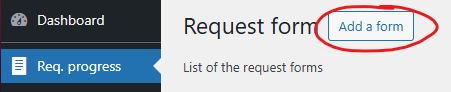
- Click on “Add a form“.
- step :
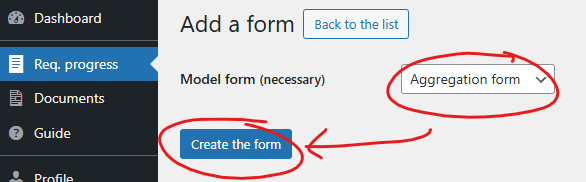
- Select the model form “Aggregation Form”.
- Click “Create the form”.
- step :
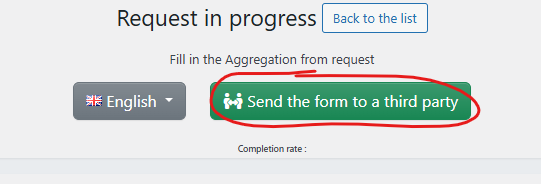
- You can fill the form partially or not
- Click “quez maintenant sur “Send the form to a third party“.
- step :
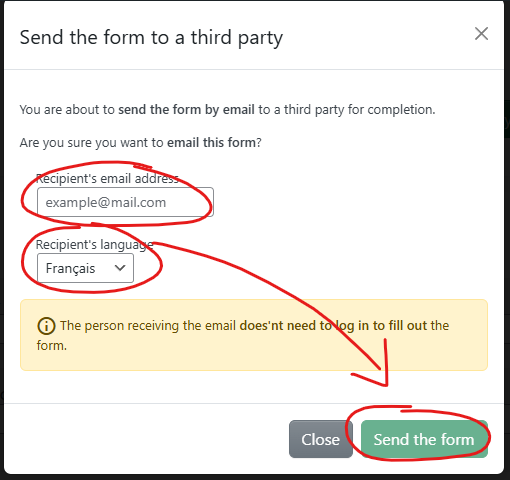
- Enter the email address of the person designated to complete the form..
- Change the language if necessary (the recipient can also do this)
- Finally, click on “Send the form“..
- étape :Your request has now been created and sent by email to the recipient!
-
- You can see the date and time of your submission in the ‘Sent to a third party?’ column.
- You can also check the status of the request in the ‘Forwarded by third party to delegate?’ column.

To find out more about the general monitoring of your current requests, please continue on this guide : Track your requests